From the blog
Real estate brokerage website CMS multi-agent teams can actually run

"You need a real estate-specific CMS - Placester, RealGeeks, Sierra, BoomTown. Generic platforms can't handle MLS." We hear it from new agents every quarter, and it is, politely, wrong. The MLS half is true: IDX has to come from a board-approved vendor. The CMS half is not. We rebuilt MeridianCove this spring on a proper real estate brokerage website CMS multi-agent workflow - kept our IDX provider, replaced everything around it, and stopped fighting our own website.
The vertical-CMS trap nobody warns new brokers about
Placester, RealGeeks, Sierra Interactive, BoomTown, kvCORE - the pitch is always the same. You're a brokerage, so you need a brokerage product. IDX baked in, agent profiles baked in, lead capture baked in. Sign here.
The trap is what "baked in" actually means in 2026. The agent bio page is one of three layouts. The neighborhood page is whatever the template renders, with a hero image you can swap and a paragraph you can edit and nothing else. The listing landing page - the URL you'd want to text a buyer - is auto-generated from MLS fields with no room for the agent's walkthrough notes, the off-market history, the ALTA survey quirks, or the staging photos that aren't in the feed. And when your top producer wants a custom landing page for a $4.2M waterfront listing tomorrow morning, you're filing a ticket with a vendor whose roadmap doesn't care about your GCI.
Most brokerages outgrow the all-in-one before they realize it. The MLS feed works fine. Everything else is a fight. The fix is not another vertical SaaS; it is a general-purpose CMS run by a team that understands brokerage operations. Book a 20-minute brokerage walkthrough and we'll show you the split on a live demo tenant.
What "keep the IDX, replace the CMS" actually looks like
An IDX feed is a data product. Your MLS - Charleston Trident MLS for us - licenses listing data to approved vendors (iHomeFinder, Showcase IDX, IDX Broker, Realtyna) who give you an embeddable search experience that meets the board's display rules. That part is non-negotiable and frankly fine. The IDX provider handles listing detail pages, saved-search emails, and lead routing into your CRM. Workspace CMS handles the other 80% of your site - the part that ranks, converts, and gets shared:
- Agent bio pages with a per-agent URL, schema markup, and a layout the agent can suggest changes to without learning HTML.
- Neighborhood guides- one page per Charleston submarket (Mount Pleasant, Daniel Island, James Island, Folly Beach, downtown peninsula) with proper
Placeschema and internal links into active listings. - Listing landing pages for hero properties, with custom photography, drone reels, the floor plan PDF, the seller's story, and
RealEstateListingJSON-LD that gives Google something to surface. - Office and team pages- one URL per branch with hours, parking notes, the team roster, and structured data tied to each location.
- Quarterly market reports with charts your buyers' agents can actually share without a screenshot.
- Blog posts that compound - first-time-buyer guides, 1031 explainers, BPO vs. appraisal, what a seller's net sheet means.
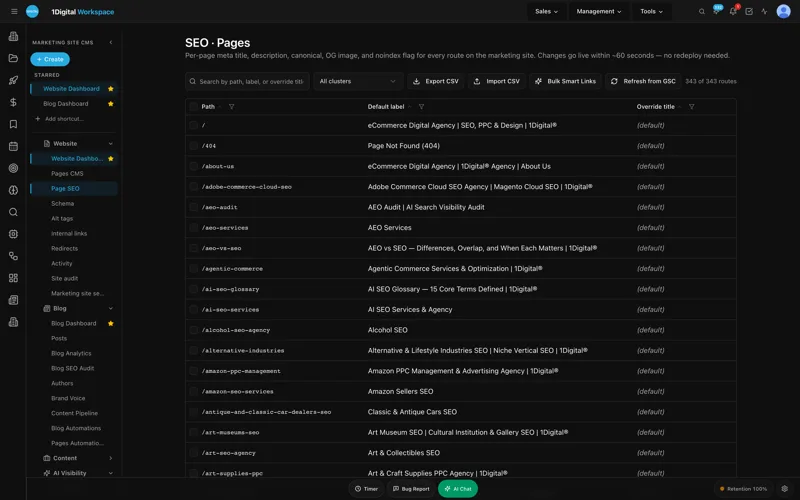
The IDX iframe stays where it is. Everything around it gets real content management - and the managed-change workflow documented on the marketing site is what makes the volume sustainable across a 25-agent team.
Picking a real estate web design agency that won't lock you in
Here is where most brokerages get burned. You hire a real estate web design agency, they build something pretty on a proprietary stack, and two years later the only people who can touch a button color are them. The agency is also the CMS. The CMS is also the host. Leaving means starting over.
The pattern we wanted, and the pattern Workspace CMS is built around, is the opposite. The platform is the platform. The agency is the team running it for you. If you ever decided to take the keys back, the export is clean - pages, posts, redirects, schema, alt tags, sitemap, everything. We've watched too many friends get stuck on a proprietary realtor marketing agency stack to sign up for that again.
The other thing a competent real estate website designer should be doing in 2026 is treating your bio pages, your neighborhood guides, and your listing landing pages as separate page types with separate templates, separate schema, and separate publishing workflows. Inside Workspace CMS each of those is a first-class content type, not a hack on top of a generic "page."
UNLIMITED MANAGED CHANGES
Send a ticket. We ship the change.
Every Workspace CMS plan includes unlimited managed CMS edits. Essentials ships in 4 business days. Growth ships in 2. Premium ships in 12–24 hours. No per-edit fees. No "open a Jira" overhead. Every new-listing landing page, every agent bio rewrite, every neighborhood-guide refresh - describe what you need and our team builds it on your live site.
A real estate brokerage website CMS multi-agent teams can actually run
The brokerage problem nobody at the SaaS demos talks about: you have 25 agents, each of them wants their bio page updated, and three of them are listing-heavy producers who want a custom landing page per property. In our experience, that translates to roughly 8–14 content change requests per week across a 25-agent team - the kind of volume that quietly eats a marketing coordinator's entire job if you let it.
Workspace CMS is built around unlimited managed CMS changes on a turnaround you can count on. The phrase the team uses is "send a ticket; we ship the change." An agent emails the rewrite to your designated address, a ticket lands in the queue, real humans using real AI tools make the change, and you get a preview link to approve before it ships.
Behind that ticket queue, a handful of platform features do the heavy lifting:
- Theme & Brand Voice locks the palette, type scale, and an AI-tuned voice profile to your brokerage. When the team drafts a new bio for a transferring agent, the language already sounds like MeridianCove - not generic GPT mush.
- Per-Tenant Isolation + White-Label admin means each agent sub-portal (we run one per top producer) has its own RBAC scope and audit trail, while the parent brokerage sees everything in one rolled-up view.
- Multi-Location Storefront powers the office pages - Mount Pleasant, downtown Charleston, Daniel Island - with a real store locator, map, and ZIP search that ties each office's hours and team into structured data.
- Automations schedule the recurring work nobody wants to remember: a weekly AI Site Audit, a monthly alt-tag sweep across new listing photography, a quarterly link-equity report.
- Internal-Link Rules automatically wire new neighborhood guides into the agents who specialize there, and wire new listing pages into the matching submarket - so the link graph stays tight without anyone hand-editing.
- Analytics (GA4 + GSC unified) puts traffic and ranking data on one screen so the designated broker can see which neighborhood pages are pulling weight before the Monday meeting.
No per-seat license. No agent learning a page builder. No marketing coordinator copy-pasting bios at 9pm. The audit log shows who requested what and when it shipped - useful when your designated broker wants to know which agent's compliance disclaimer changed last quarter. The full feature inventory covers another dozen tools we use less heavily, but those are the ones that earn their keep weekly.
Schema markup is the unfair advantage Placester won't give you
Here's what quietly moves listings in 2026: RealEstateListing JSON-LD on listing landing pages, Place markup on neighborhood guides, RealEstateAgent on agent bios, and proper Open Graph cards on everything. When an agent texts a listing link into a buyer's group chat, the preview card needs hero photo, price, beds/baths - or the link dies on arrival.
The Structured Data (JSON-LD) editor in Workspace CMS lets us set listing-specific schema per page without hand-writing it, with live validation before publish so we never ship broken markup. Same panel handles canonical tags, meta descriptions, and Open Graph images. Try that inside Placester's template and you'll end up in a support thread that closes with "this isn't currently supported." Since the switch, referral traffic from agent-shared links has roughly doubled quarter-over-quarter, and our share of "who is the best brokerage in [submarket]" prompts inside ChatGPT and Perplexity is finally trending the right direction.
Which tier makes sense for a brokerage
Workspace CMS runs on a three-tier ladder:
- Essentials - $89/month. Self-managed, 4-business-day SLA, AI Blog Generator, AI Visibility Tester (5 prompts), 200 AI credits, all SEO controls. Fine for a solo agent. Not enough turnaround for an active brokerage.
- Growth - $199/month. Managed by 1Digital. Unlimited content edits, image swaps, locations, and blog on a 2-business-day SLA, same-business-day on blockers, 1,000 AI credits, 15-prompt AI Visibility tracking, white-label admin, Google reviews on your site (display and reply). Most teams land here, including brokerages under ~20 agents.
- Premium - $449/month. White-glove, 12–24 hour SLA on changes, 4 business-hour SLA on blockers, 2,500 AI credits, 30-prompt monthly AI Visibility tracking, daily AI Site Audit + LLM visibility digests.
For a 25+ agent brokerage, Premium is the right tier - not for the credits but for the SLA on listing landing pages. When a top producer hands you a $2M listing Tuesday and wants the custom page live before Saturday's open house, 12–24 hours from ticket to ship is the difference between a polished launch and a placeholder. The full ladder is on the pricing page, and the case studies gallery walks through a few brokerages that landed at each tier.
What the switch actually costs in time
Most clients launch in two weeks. For us that meant one week to migrate agent bios, neighborhood pages, and 14 months of blog content out of the old vendor, plus a second week for design pass, IDX re-embed, schema audit, and redirect map. The Redirect Manager with conflict detection caught 38 legacy URLs we would have 404'd otherwise - including listing pages still ranking for closed deals, which we redirected to the relevant neighborhood guide rather than losing the equity. The Site Audit then swept the migrated content for the usual gremlins (missing meta, oversize hero images, broken internal links) and fixed most of them in one pass. No page-builder fighting. No HTML required. Other brokerage-shaped launches in the live demo gallery follow roughly the same two-week shape.
Real estate brokerage website CMS multi-agent teams can FAQ
Do we have to give up our existing IDX provider?
No. Workspace CMS doesn't replace IDX - it sits around it. Whatever your current provider is (iHomeFinder, Showcase IDX, IDX Broker, Realtyna, or a board-direct feed), the embed code drops into a Workspace CMS page the same way it would on any other site. Your MLS data display rules are unaffected.
How does this work for agent bio pages at scale?
Each agent gets their own URL (typically /agents/firstname-lastname) with RealEstateAgent schema, headshot, license number, designations (CRS, ABR, GRI), neighborhood specialties, and recent transactions. The Theme & Brand Voice profile keeps every new bio sounding like the same brokerage. Agents email changes to a designated address; the Workspace CMS team ships them under the SLA tied to your tier. No agent needs login credentials unless you want to grant Editor or Viewer roles.
Can we get custom landing pages for individual listings?
Yes - that's the use case the Premium tier was built around. You send the MLS number, the seller's narrative, photography, and any additional assets (drone reel, floor plan, ALTA survey notes). The team builds a dedicated landing page with RealEstateListing JSON-LD and proper Open Graph cards, usually within 12–24 hours. The IDX detail page still exists for the formal listing; the landing page is the URL your agent texts and posts.
What about compliance - fair housing, license display, broker supervision?
Compliance footer, equal-housing logo, license numbers, and state-specific disclosures live in a global template controlled by Owner role only. The audit log records every change with timestamp and requester - exactly what your designated broker wants when the state board asks about supervision.
How does the AI Visibility Tester help a brokerage specifically?
It tracks how ChatGPT, Claude, Perplexity, and Gemini answer prompts like "best buyer's agent in Mount Pleasant SC" or "Charleston SC brokerage with relocation services." When buyers ask LLMs before Google, knowing whether your brokerage is cited - and on which queries - is the new local SEO. Premium monitors 30 prompts monthly; Growth covers 15.
The honest takeaway
If your current vendor is making you trade off edit speed or content quality, the vertical-CMS premise is the thing to question - not your marketing budget. Keep the IDX feed. Replace everything around it with a CMS run by a real estate web design agency that ships changes on a turnaround you can count on. Send us your current site for a no-pressure teardown and we'll tell you, plainly, whether the switch makes sense for your team.


